Get the app
For Google Nest · iPhone & Android

Never get surprised by your energy bill again.

You budget groceries, gas and fun money. ThermoBudget connects to your Google Nest, tells you every day whether your heating and cooling is on track for your budget, and estimates what your comfort costs before the bill arrives.

30 days free, then $2/month or $21.60/year. Cancel anytime.

Sign in with Apple or GoogleBill files never storedYou tap Apply, always
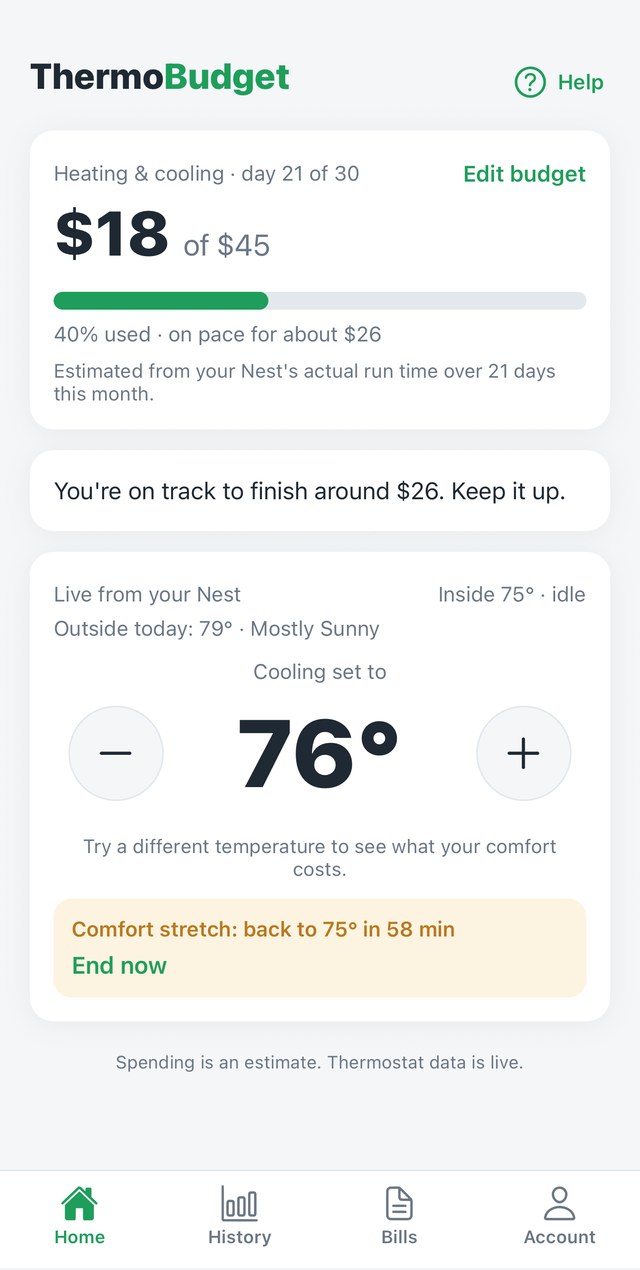
ThermoBudget home screen showing $18 of a $45 heating and cooling budget, a live Nest reading and a temperature preview

Your energy bill is the one expense you only see after you've spent it.

By the time the bill arrives, the money's gone. ThermoBudget shows where you stand every day, while you can still do something about it.

1

Add your bills, set a budget

Snap a photo or upload the PDF of your electric or gas bill. ThermoBudget reads it, keeps the numbers (not the file) and suggests a realistic monthly heating and cooling budget.

2

Know if you're on track

Your Nest reports how long your system runs. ThermoBudget turns that into an estimated dollar amount and lets you know before you go over.

3

Choose your comfort

Preview any temperature and see what it saves or costs. Apply it for an hour, a few hours, or until you change it. Your call.

Inside the app

Simple on purpose

Four tabs, plus Help one tap away. Swipe between them. No energy jargon. Dollars first.

ThermoBudget Home screen

Home

Your budget, today's pace and your live thermostat in one place.

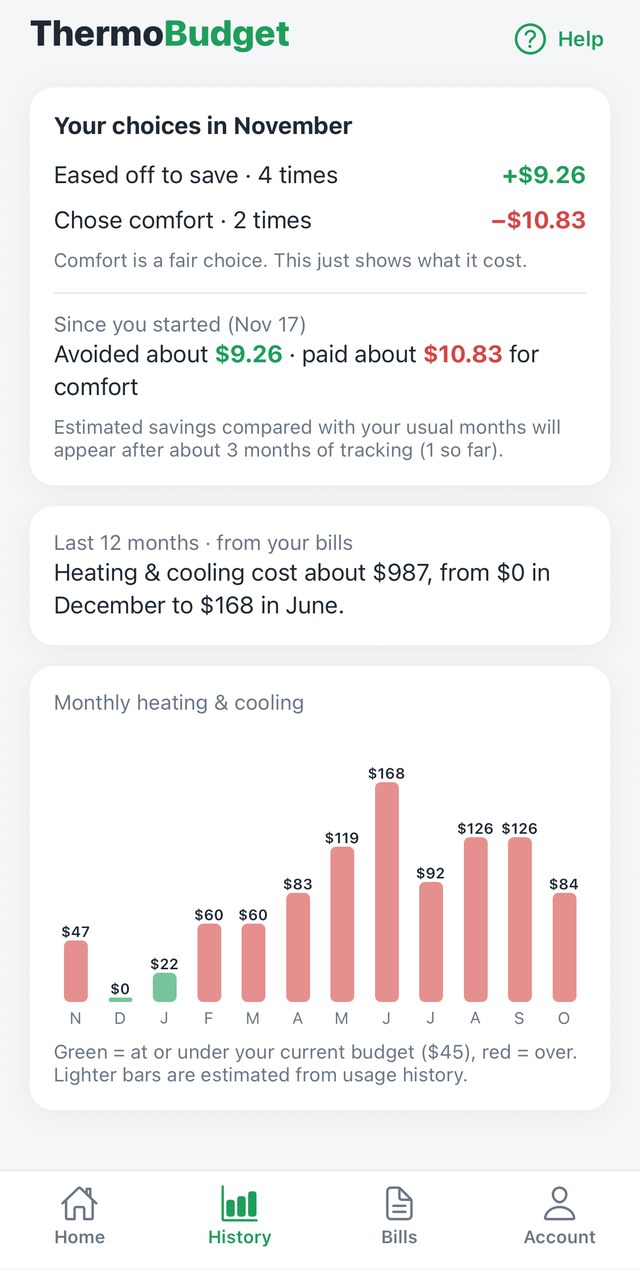
ThermoBudget History screen with monthly heating and cooling costs

History

What you saved, what you paid for comfort, and how each month compared.

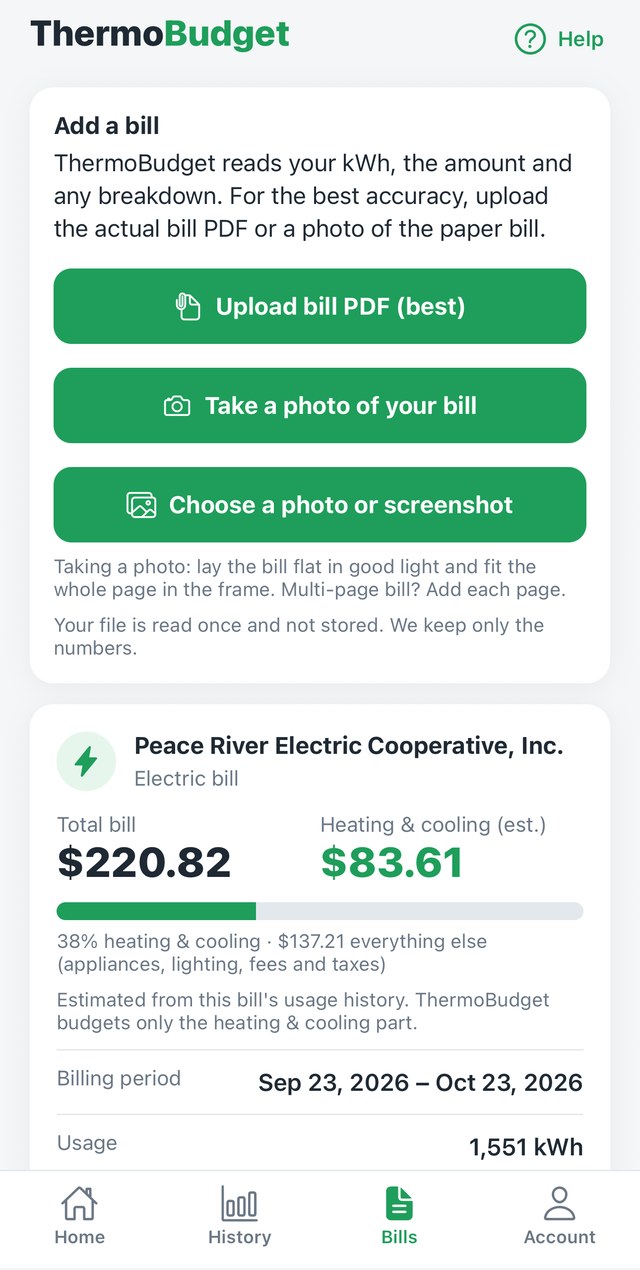
ThermoBudget Bills screen with an electric bill split into heating and cooling

Bills

Upload a PDF or photo. The app splits out the part your thermostat controls.

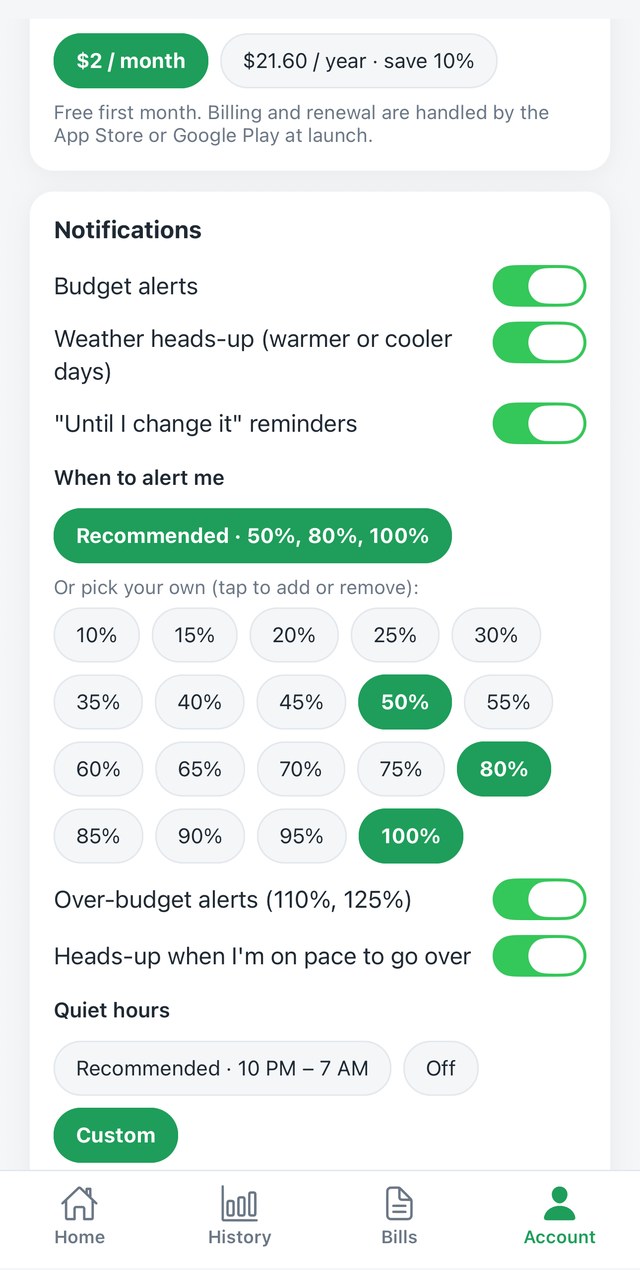
ThermoBudget notification settings with custom budget alert levels

Alerts

Recommended alert levels, or pick your own. Plus pace and weather heads-ups.

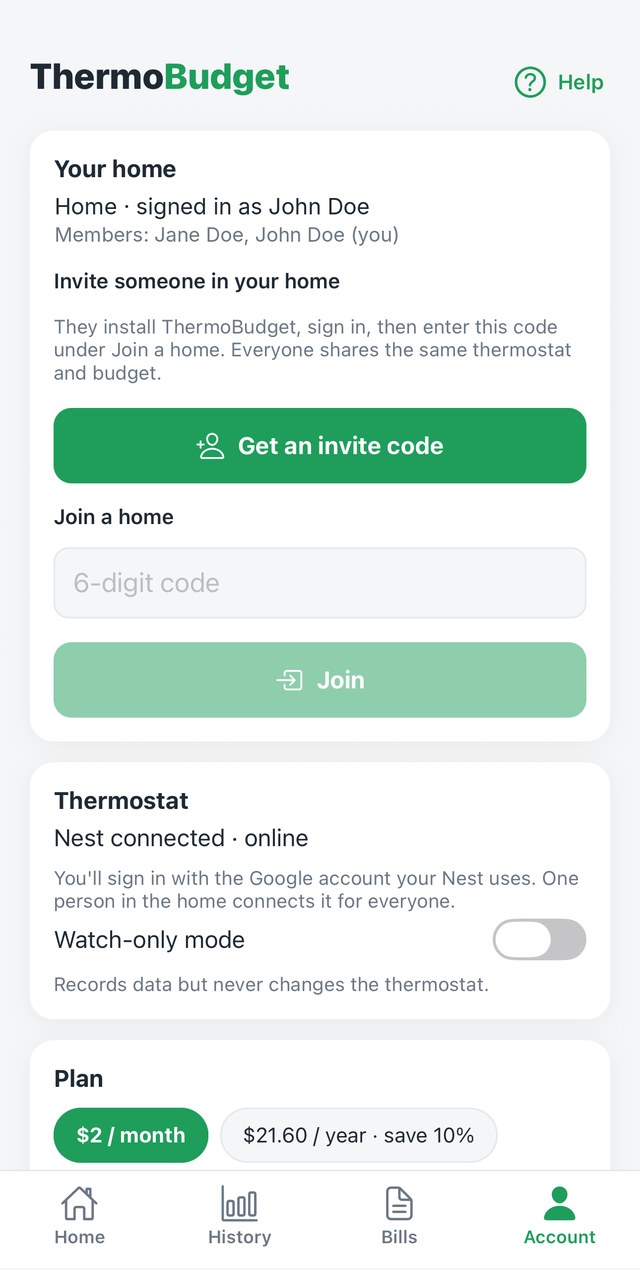
ThermoBudget Your home screen showing household members and an invite code option

One home, everyone in

Invite family with a 6-digit code. Everyone shares the same thermostat and budget.

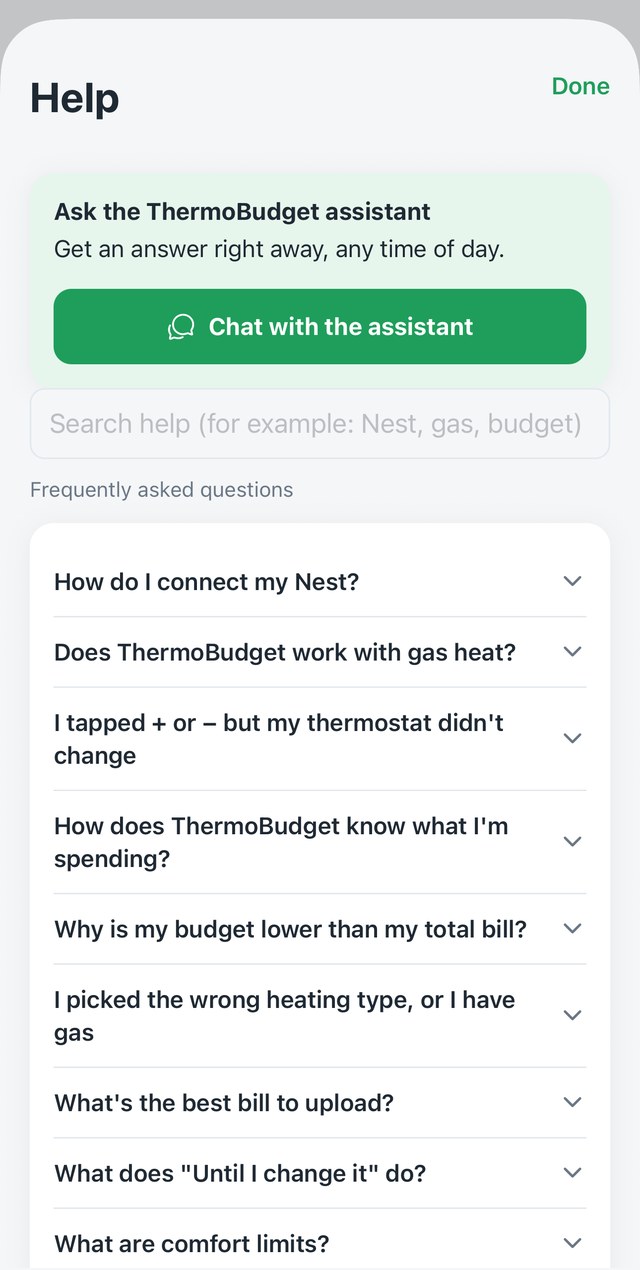
ThermoBudget Help screen with the AI assistant and searchable FAQ

Help & assistant

Search the FAQ or ask the built-in AI assistant. A real person is one email away.

Real screens from the app, using one home's numbers. Names shown are placeholders.

What's your comfort worth?

No guilt. Just the price tag.

Other apps tell you to save energy. ThermoBudget tells you what each choice costs, so you decide.

+$0.84Set to 77° for 2 hours
−$1.10Keep it at 72° tonight. Your call.
Safe by design

A budget tool, not a thermostat takeover

ThermoBudget never decides for you. It only changes your temperature when you tap Apply, and it has guardrails built in.

50–80°

Heating range

The app won't set heat below 50° or above 80°. Warnings appear before you drift too low, including a heads-up about frozen pipes.

68–85°

Cooling range

Cooling stays between 68° and 85° to protect your system and your home. Your own comfort limits can only narrow these ranges.

1 per 5 min

Gentle on your equipment

Changes are spaced out: at most one every 5 minutes, 6 an hour and 20 a day. Every change is logged so you can see what happened.

Always yours

You stay in control

It never switches heat, cool or off, and never cuts off your comfort. Undo anything from the app or from your thermostat. Need to go past a limit? Use your thermostat or its own app directly.

ThermoBudget is a budgeting tool, not a safety system. Please set comfort limits that are safe for everyone and everything in your home. Read the terms

Built for Google Nest

Electric heat, heat pumps and natural gas furnaces all work. We're building support for more smart thermostat brands, with no set dates yet. We'll announce each one when it's ready.

Google Nest · works today
More smart thermostats · in the works
Pricing

Less than a cup of coffee a month

New subscribers get 30 days free. Cancel anytime before it ends and you won't be charged.

Monthly
$2/month

After your 30 days free

Annual · save 10%
$21.60/year

That's $1.80 a month

Subscriptions are handled securely by the App Store and Google Play. Cancel anytime in your subscription settings and keep access through the period you've paid for.

From the founder

Hi, I'm Joe. I built ThermoBudget because my energy bill was the only expense I never saw coming. It's running in my own Florida home with my Nest today. A budget is simply knowing the cost before you commit, so the bill never surprises you.

"The plans of the diligent lead to profit as surely as haste leads to poverty." (Proverbs 21:5, NIV)

Get ThermoBudget

For Google Nest, on iPhone and Android. 30 days free, then $2/month. Cancel anytime.

Have a different smart thermostat? We're working on more brands. Email support@thermobudget.com and tell us which one you have.

Questions

Which thermostats does it work with?

Google Nest thermostats, through Google's official Device Access program. We're building support for other smart thermostat brands, but there are no set dates yet. We'll announce each one when it's ready.

Does it work on iPhone and Android?

Yes. Sign in with Apple on iPhone or with Google on Android. Family members on either kind of phone can share the same home.

How much does it cost?

New subscribers get 30 days free. After that it's $2 a month or $21.60 a year. You subscribe through the App Store or Google Play and can cancel anytime in your subscription settings. Cancel before the 30 days end and you won't be charged.

Does ThermoBudget stop my heat or AC when I hit my budget?

No. ThermoBudget never cuts off your comfort. It tells you whether you're on track and what each temperature choice is likely to cost, and you decide.

Will it change my thermostat on its own?

No. It only changes the temperature when you tap Apply. Timed changes return to your previous temperature when the time is up, and you can undo any change from the app or your thermostat.

Are there limits on what it can set?

Yes. ThermoBudget keeps heating between 50° and 80° and cooling between 68° and 85°, and spaces out changes to protect your equipment. For anything beyond that, use your thermostat or its own app directly.

What bills can I upload?

The PDF from your utility's website or a photo of the paper bill works best, for electric or gas. Email summaries and screenshots work too, though they're less accurate. ThermoBudget keeps the numbers, not the file.

How does it know what I'm spending?

It estimates cost from how long your heating and cooling actually run, the weather and the rate on your bill. Tap "Why this amount?" in the app to see the reasoning. It's an estimate, not your utility's official bill, and it gets more accurate as you add bills.

Does it work with gas heat?

Yes. Electric heat, heat pumps and natural gas furnaces all work. Upload your electric bill for cooling and your gas bill for heating.

Can my family share it?

Yes. One person connects the Nest, then family members join that home with a 6-digit invite code. Everyone shares the thermostat, one monthly budget and alerts. Bills you upload stay on your own phone.

What are system alerts?

An optional feature that uses your system's run time and local weather to estimate air filter life, suggest tune-up timing and let you know when your heating or cooling seems to be working harder than usual. It's off until you turn it on, it's an estimate rather than a diagnosis, and nothing is shared with HVAC companies.

Do you support more than one thermostat?

Today ThermoBudget tracks one thermostat per home. Support for homes with two or more thermostats is in the works.

My thermostat came with my apartment. Will it work?

If it's a Google Nest you can sign in to, yes. Some building-managed systems don't allow outside apps.

How much can I save?

It depends on your home and your choices. The U.S. Department of Energy estimates that setting your thermostat back 7–10°F for 8 hours a day can save up to 10% a year on heating and cooling. ThermoBudget's main job is making sure the bill is never a surprise.

What do you do with my data? Can I delete it?

We use it only to run your budget and the features you turn on. We never sell it. You can delete your account from inside the app (Account, then Delete account). See our privacy policy.

Who answers questions?

Use the Ask ThermoBudget chat on this page for quick answers from our AI assistant, or email support@thermobudget.com and a person will reply within 48 hours.